Measuring 100v line audio systems
100 volt line (or high impedance) audio systems are the most commonly used for commercial and large scale public address and background music.
When do you measure the speaker load on a system?
If you need to add more loudspeakers to an exisiting system, you should first check the amplifier can take the additional speaker load. The installer will need to measure the speaker load beforehand when planning to add more speakers (or alternative speakers) to an existing system.
Why would you want to measure the speaker load connected to an amplifier?
When working on a public address system there are many times that having a method of measuring the speaker load connected to an amplifier comes in very handy and can also be a lifesaver.
These can include amongst others…
- Needing to add speakers to an existing installation and you’re not sure if the amplifier can take the additional speaker load. Even if you can manually count the speakers on site, they could have multiple power taps and you might not easily be able get to each speaker to check what it is set to. Even if you can do this, it will most certainly not be a quick job! When installing a new sound system you should check the speaker line to ensure it’s safe to connect to your amplifier.
- Or if you have a fault on an audio system and you need to check that the amplifier isn’t overloaded or you have a short circuit on the cabling. Overloaded and short circuit speaker lines can lead to costly repair bills and most manufactures warranties will not extend to damage caused by this.
How to use an impedance meter to test the load on your 100v line audio system:
Having the correct test meter for the job will save you time and money and could even prevent damage to expensive equipment.
As an installer, having a meter to measure the speaker line is an invaluable tool! And the meter used for this task is an impedance meter. It’s a simple, cost effective solution to make your work easy.
You simply disconnect the speaker line you need to check from the speaker terminals on the amplifier. Connect the impedance meter to the twin speaker cable you have just disconnected. Press the test button on the meter and an impedance reading in ohms will appear on the display.
This reading can then be used to determine the speaker load connected by either cross referencing your reading to an impedance-to-watts chart, or performing a simple maths calculation. Another way is by checking the reading against the minimum impedance displayed on the back of the public address amplifier.
Job done, all in a few minutes!
How to measure a 100v line speaker load
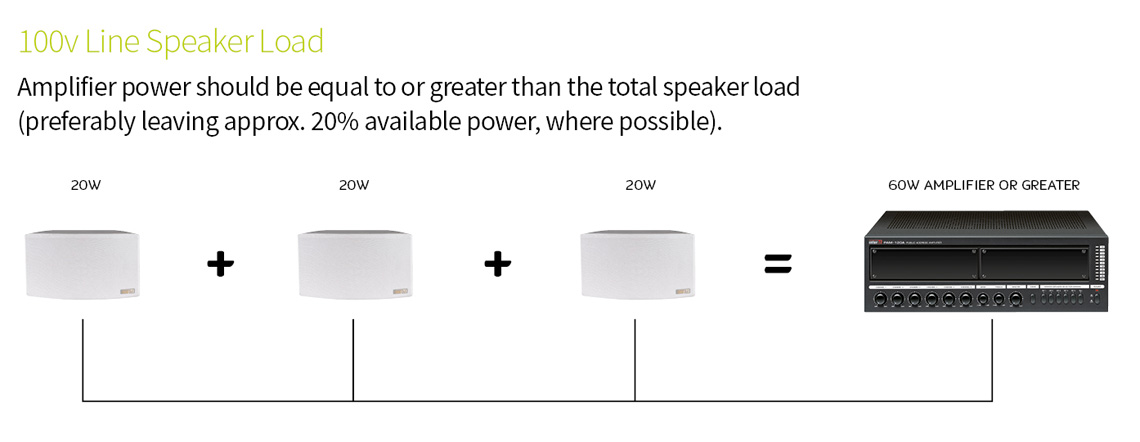
To calculate the required value of a 100v line amplifier power, simply add together the power of each loudspeaker.
Can I use my standard electrical multimeter to test the speaker circuit?
The simple answer is no. You cannot use the resistance range on a standard electrical multimeter as this will only give you the DC resistance of the speaker line. Using a DC resistance reading will not work!
A loudspeaker line is driven by AC voltage from the amplifier. An impedance meter will test the line using an AC waveform normally at a frequency of 1KHz. A standard electrical multimeter willn’t perform this test.
So measuring 100 volt line loudspeaker lines is relatively simple and is going to save you time and trouble to ensure a reliable PA system.