


How to Connect Apple TV to an Analogue Amplifier
 There are both home and commercial examples of why an Apple TV may need to be connected to external amplifiers including:
- In the home, somebody may wish to connect the audio from the Apple TV signal into a surround sound or home cinema system.
- In a commercial AV application such as boardroom environment where the audio from the Apple TV may need to be connected with an installed audio or PA system.
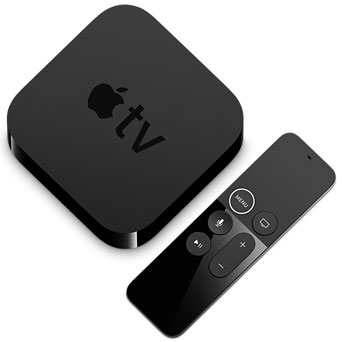
On the Apple TV, it is noticeable that there are not many connections on the device which is a typical characteristic of most Apple products. Connections on the device include: a power connection, HDMI output, USB connection, an optical audio output and Ethernet connection.
Option 1: Using an optical audio output
The first option for connecting the audio from the Apple TV to an external amplifier is by using the optical audio output which uses a Fibre-optic cable directly from the TV box to your amplifier. There are a wide variety of home entertainment systems on the market that have at least one audio optical input. This option is the most simple and easy way because the work is done for you, however, the problem is that not all amplifiers and audio systems feature digital optical audio input.
Option 2: Using a DAC device
There are many more amplifiers and audio systems on the market that only have analogue audio input options and do not feature digital optical audio input. The solution in this situation would usually be to use a DAC device (Digital to Analogue Converter). A simple, low cost DAC device will input the digital audio signal from the Apple TVs optical output and convert it into analogue audio, usually via a Dual Phono Connector; this can easily be connected to a conventional analogue audio system.
 Option 3: Using a HDMI audio de-embedder
There is another option that would be useful if the distances between the location the Apple TV device and the display screen exceed the recommended 10 metre limit on the HDMI cable. The output of the Apple TV which carries both video and audio output signals which can be connected to a HDMI Repeater with audio de-embedding functionality. This enables an increased HDMI signal transmission distance as well as splitting off the audio from the HDMI. The picture from the Apple TVs HDMI then comes out through the de-embedders HDMI output which in turn connects directly to the television, display screen or projector.
Both DACs and HDMI audio de-embedders work in just the same way with other digital AV sources (such as Blu-ray, DVD players and games consoles) to provide the best sound performance via your analogue audio system.

