


There is a whole host of information stored inside your display screen / TV and source to ensure you get the best information for the best picture and audio results. – which is known as EDID (Extended Display Identification Data).
EDID is an industry standard for AV Source and Display devices which automatically communicates manufacturer specification and data between devices. This allows your AV source to send the best compatible signal data to your screen, TV or projector to ensure the best possible picture results.
What devices use EDID?
Generally, the source device will be a computer graphics card on a desktop/laptop PC. However provisions are in place for many other devices, to read EDID and output video accordingly these include:
- HDTV receivers and DVRs
- DVD and Blu-ray Disc players
- Gaming consoles
Originally developed for use between analog computer-video devices with VGA ports, EDID is also now implemented for DVI, HDMI, and DisplayPort.
EDID data does EDID transmit?
- Brand
- Product Code
- Date of Manufacture
- Video Input Type
- Horizontal and Vertical Size
- Supported features
- Colour characteristics
- Timing information
What issues can EDID cause?
Display devices can have various levels of EDID implementation and, in some cases, they may lack EDID information all together. Such inconsistencies can cause operational issues ranging from overscan and resolution problems, to the display device not displaying the source content at all.
Problem |
Causes |
| No image is shown on the display. | The source device e.g. a PC graphics card or laptop, cannot read the EDID information from the display. Which in some cases, results in the PC not outputting any video signal. |
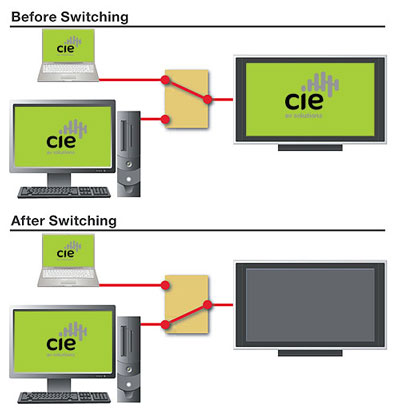
| The display loses the image when a new source has been selected. | This is a common problem with VGA sources, due to the lack of hot plug detection. Hot plug detection is supported for DVI, HDMI, and DisplayPort, EDID communication problems can occur however from inconsistencies in the implementation of HPD signaling between devices from different manufacturers. This frequently becomes an issue for professional integration, since the ability to switch digital video signals is a necessity. |
| An image is shown, but the source resolution does not match that of the display. |
A PC cannot read the EDID information, so it defaults to a standard resolution. If the user attempts to manually set the resolution to match the display, some graphics card drivers may enforce the lower default resolution and create a scrolling/panning desktop without actually changing the video resolution. The PC is able to read the EDID information, but the graphics card limits the output resolution to XGA 1024×768, a resolution most displays can accommodate. If this does not match the native resolution of the display, fonts will likely appear to be abnormal size or fuzzy. The PC is connected to multiple displays with different native resolutions. Since it can only read EDID from one display, the output will be mismatched in resolution with all other displays.This is a common error in professional systems when video signals need to be distributed or routed to multiple displays. |
EDID Solutions
AV systems typically comprise several remotely located displays and often include multiple source devices. It is important to realise this can potentially contribute to EDID-related issues. The necessity to switch, distribute, and route signals from sources to displays presents a considerable challenge in terms of ensuring proper EDID communications and therefore reliable system operation.
To help prevent or solve many of the issues you must properly manage EDID communications between sources and displays in AV systems. Matrix switching environments represent the most difficult EDID management situation, with simultaneous EDID communications required for multiple inputs and outputs. The displays connected to the outputs are very likely to be of different models and native resolutions. The EDID information between them is different and needs to be conveyed to the source devices. Proper EDID management within the system is crucial to consistent and reliable operation.

